
New Articles up

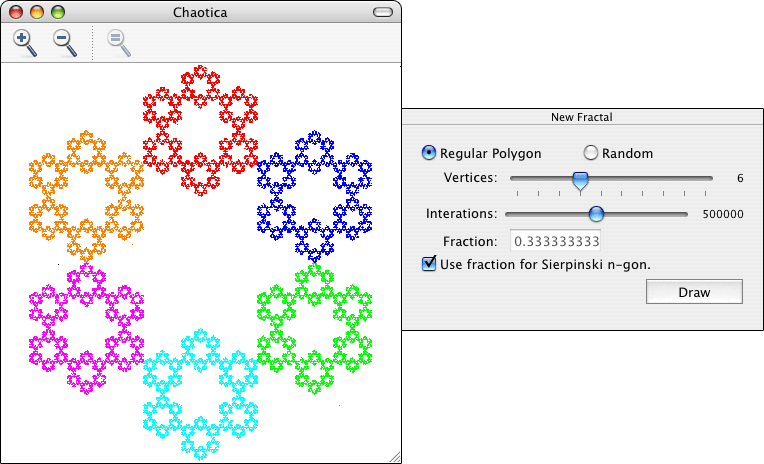
Today I posted two new articles. First, I released Chaotica, a Mac OS X application to draw fractals using the Chaos Game. For more information follow the link. It’s amazing how with a few very simple rules and playing around with a few parameters you can create some very nice fractals. If you haven’t already, you should try it out. I’ve been thinking about some of the changes that would be great for future versions of Chaotica, like the ability to choose the exact positions of the vertices, or to use OpenGL to improve the performance. I’m not sure, if I’ll ever get to do this, but it’s definitely in my mind. The other article I posted comes from my old blog. It explains how to sort a list like the Finder does, I think that Cocoa programmers will find it very useful. There really isn’t much to say about this one, but if you’re interested feel free to use it, here’s the link.

I have another article planned to explain some aspects of the Chaos game, but I’m not sure of when it’ll be available. Hopefully, I’ll be able to finish it before friday, but if not, it’ll have to wait till I get back from visiting my sister in Canada.

Sorting Like the Finder

Something that most Cocoa programmers are likely encounter in their lifetimes is trying to sort a list like the Finder. At first sight, it might seem like there’s nothing special about how the Finder sorts; it looks like a plain old alphabetical sort. But it isn’t, there are many subtleties with the way in which the Finder sorts a list of documents. A simple example of this is when you have three documents called “1”,”2″, and “10”. A normal alphabetical sort would order them: “1”,”10″,”2″. But the Finder is smart enough to order them: “1”,”2″,”10″.

The basic code to sort like the Finder comes from Apple’s Technical Q&A QA1159. Using this code, I created a category for NSString which adds a method called finderCompare: to the NSString class. This way you only need to create an instance of NSSortDescriptor and initialize it using initWithKey:ascending:selector: where selector: should be @selector(finderCompare:). Then you just need to use this instance of NSSortDescriptor whenever you want to sort something like the Finder.

You can find the code for the category below, or you can just click here to download the file. To use this file you only need to add it to your Xcode project.

#import 

@interface NSString (FinderCompare)

- (NSComparisonResult)finderCompare:(NSString *)aString;

@end

@implementation NSString (FinderCompare)

- (NSComparisonResult)finderCompare:(NSString *)aString
{
	SInt32 compareResult;
	
	CFIndex lhsLen = [self length];;
        CFIndex rhsLen = [aString length];
	
	UniChar *lhsBuf = malloc(lhsLen * sizeof(UniChar));
	UniChar *rhsBuf = malloc(rhsLen * sizeof(UniChar));
	
	[self getCharacters:lhsBuf];
	[aString getCharacters:rhsBuf];
	
       (void) UCCompareTextDefault(
          kUCCollateComposeInsensitiveMask
        | kUCCollateWidthInsensitiveMask
        | kUCCollateCaseInsensitiveMask
        | kUCCollateDigitsOverrideMask
        | kUCCollateDigitsAsNumberMask
        | kUCCollatePunctuationSignificantMask,
        lhsBuf,
        lhsLen,
        rhsBuf,
        rhsLen,
        NULL,
        &compareResult
       );
	
	free(lhsBuf);
	free(rhsBuf);
	
	return (CFComparisonResult) compareResult;
}

@end

Chaotica


Click to enlarge.

Chaotica is a Mac OS X application that draws fractals using the Chaos Game method. To use Chaotica you simply need to specify the number of vertices that will be used, how the vertices will be chosen, the fraction that will be used, and the number of iterations performed to generate the fractal. Chaotica will first choose a point inside the drawing area at random and then it’ll choose one of the vertices, also at random. Next, it will draw a new point at the chosen fraction of the distance between the point and the chosen vertex. After that, it will use the newly drawn point and pick a new random vertex and repeat the process to find the next point. Each time a new point is picked is called an iteration. You can change the settings in Chaotica to create many different fractals. Here’s a description of what each option in the New Fractal window and the Preferences does:

New Fractal window:

  • Regular Polygon – If selected, the vertices will be placed to form a regular polygon.
  • Random – If selected, the vertices will be placed randomly inside the drawing area.
  • Vertices – A number between 3-12. It determines how many vertices will be used to create the fractal.
  • Iterations – A number between 1-100,000. It determines how many points will be calculated.
  • Fraction – The fraction that will be used to determine the distance at which a new point will be added.
  • Use fraction for Sierpinki n-gon – Uses the fraction necessary to generate the Sierpinski polygon with the selected number of vertices. An explanation on how this works is coming soon.

Preferences:

  • Background color – Self-explanatory.
  • One color for all vertices – If selected, all points are drawn with the same color.
  • Color depends on the vertex – If selected, the color of the points depends on which vertex was chosen when calculating where the point should be. This option generates nicer looking fractals.